
- How to update plugin manually through FTP
- How to update UABB?
- How to register your license?
- About Beta Versions
- Will I lose all my design work when I download and re-install the plugin?
- Getting Started with the Ultimate Addons for Beaver Builder
- How can I install the Ultimate Addons for Beaver Builder?
- Automatic Beta Updates
- How to check expiration date of license?
- How to enable / disable Beaver Builder's UI?
- UABB Global Settings
- How to White Label UABB?
- How to enable / disable Live Preview feature?
- How to Hide Templates from your Clients?
- How can I use other modules in Modal Popup / Advanced Accordion / Advanced Tab?
- How to enable / disable modules in UABB to reduce server requests?
- Section and Page Templates don’t look the same when I am using them. Why?
- How can I Begin Building a Page using UABB?
- Video Gallery Module
- How to Set Categories for Videos?
- How to Design Filterable Video Gallery?
- How to Display Specific Video Category Tab as a Default on Page Load?
- How to Set a Custom Placeholder Image for the Video?
- How to Set Overlay Color on the Video Thumbnail on Mouse Hover?
- How to Show Video Caption on Hover?
- How to Show Video Category on Hover?
- Open a Specific Filterable Tab from URL
- Introducing Table Module
- How To Add Rows And Columns to the Table?
- How to add Table Header?
- How to add Table Content?
- How to add Sortable and Searchable Table? How to Show Entries Dropdown?
- How to Merge Columns and Rows in Table?
- How to Style the Table?
- How to Override Global Settings for Image / Icon?
- Create Table by Uploading CSV
- Equal height option of Advanced Post module isn't working properly?
- How to Exclude your Current Post from Advanced Post module?
- How to Enable Taxonomy Filters in Advanced Posts?
- How to filter Query Parameters in Advanced Posts?
- How to enable Pagination for Advanced Posts module
- UABB Advanced Posts Custom Posts Layout shortcodes and usage?
- Advanced Posts Pagination not visible?
- Regenerate Thumbnails
- Open a Specific Filterable Tab from URL for Advanced Post
- Building Site-wide Modal Popups in Beaver Builder & UABB
- How can I use the Modal Popup module effectively?
- Is it Possible to Close a Modal Popup on a Button Click or Text?
- How to open a modal popup from another module?
- How to trigger a Modal Popup on the click of a Menu Element?
- How to trigger a Modal Popup on the click of an Interactive Banner 2 and from a text of any module’s text editor?
- Woo – Products Module
- How to set Grid and Carousel layout for WooCommerce products?
- How to display exact WooCommerce product with Query Builder?
- How to Set Featured Products in WooCommerce?
- How to Enable Quick View for WooCommerce Products?
- How to Exclude WooCommerce Products with Woo-Products Module?
- Filters/Actions for WooCommerce Products
- Business Reviews module
- How to get Yelp API key?
- How to find Yelp Business ID?
- How to find Google Place ID?
- How does the Refresh Reviews option function in the Business Reviews module?
- Unable to display more than 5 Google reviews/3 Yelp Reviews?
- How many numbers of reviews can be shown for Google and Yelp?
- How to get Google Places API key?
- Introducing User Registration Form Module!
- How to Create a User Registration Form using Beaver Builder?
- How to Create a User Registration Form with Only Email Field in Beaver Builder?
- Frequently Asked Questions about User Registration Forms
- Honeypot field in User Registration Form for Beaver Builder
- Google reCAPTCHA v2 and v3 in Contact Form and User Registration Form for Beaver Builder
- Troubleshooting Tips for Ultimate Addon’s Font Icons
- White Screen / Blank Screen / 500 Error After Installation
- Fatal error: Call to undefined function array_replace_recursive()
- How to Increase the Memory Limit of your site?
- Fatal error: Class 'FLBuilderAdminSettings' not found
- Failed to download template from Template Cloud
- Haven't received update notification yet?
- cURL error 51: SSL: No alternative certificate subject name matches target host name
- DIY Troubleshooting
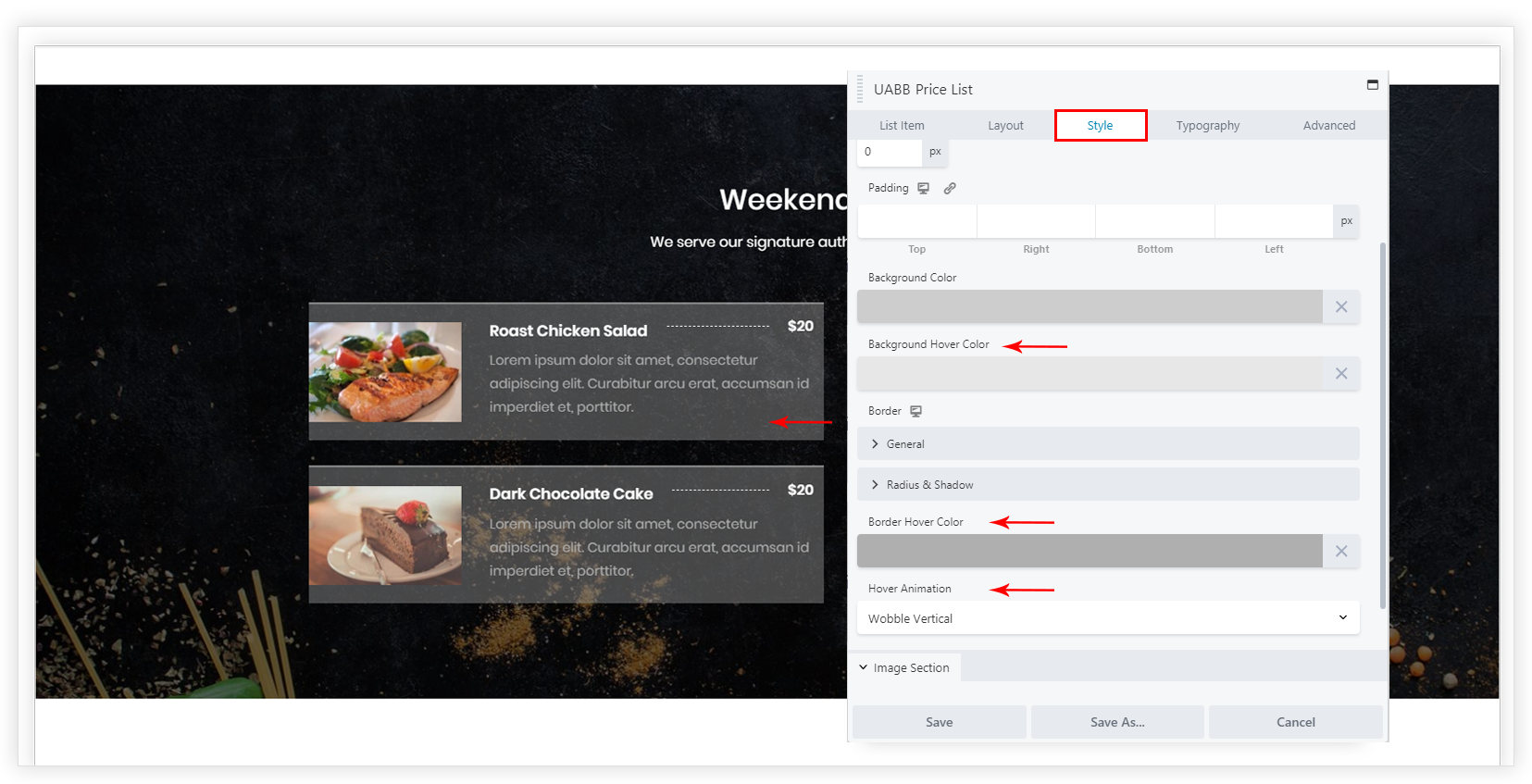
How to set Hover Colors and Animation for Price List?
Price List module provides a feature to set the hover background color, hover border color and hover animation. It improves the usability of the price list greatly.
The setting can be found under Style tab -> General section
Along with
Was this doc helpful?
What went wrong?
We don't respond to the article feedback, we use it to improve our support content.
On this page